

One of the benefits of using the Truckit Provider app is that you can share your location with customers, allowing them to keep up to date with their delivery.
The first time you login to the app you will be shown a popup with a brief overview of Truckit's location tracking. You will then be prompted to set your Location Settings to 'Always'.
In order for the tracking to function properly you will need to select 'Always Allow' when prompted. This is a technical requirement to ensure a good tracking experience for your customer, otherwise the tracking will not function. But don't worry, you will have full control over when you wish to be tracked, as you will read below.
Before you leave to go and collect a job, make sure you go into the job screen and click 'Start Job'. When starting the job you will also be given the options to:
With Truckit tracking you are in full control, to turn tracking on or off for all customers, simply use the 'Online' switch on the home screen (see below).
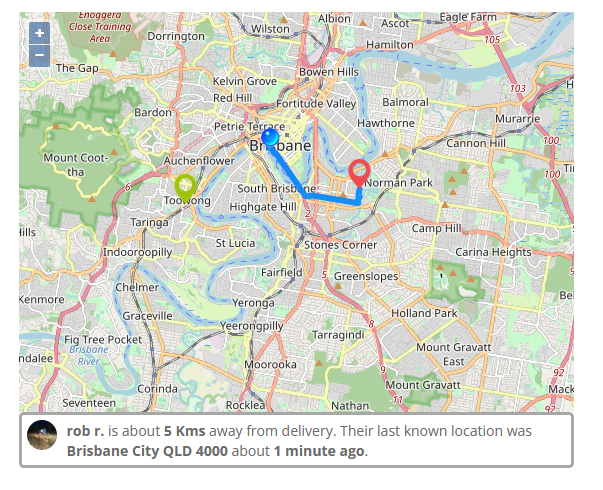
When you are Online, customers who have a job in progress will be able to see your current location on a map as well as an estimate of the distance to the collection or delivery (example below).
When you are Offline, nobody will be able to see your location, only your last known location from when you were last online.
Customers can view your location on a map when their job has been started and you are set to Online. If both of these conditions are met, then the customer will be able to see a map on their listing page that looks something like the below.
Good to know tip: To maintain a level of privacy, there is a zoom limitation on the customer map which means they can not zoom all the way in to see your exact position on the map.
We hope that this assists in your queries about our tracking options! As always, if you have any further questions or queries, please reach out to us on 1800 859 850 or support@truckit.net.


News TK Truckit Australia's freight marketplace 28th of October 2026 · 5 min read Truckit.net has been named a finalist in the Financial Review BOSS Most Innovative Companies 2026, in the Property, Construction & Transport category. We were recognised for Truckit AI: instant pricing and smart job search. We are honoured to be on the list. Freight is a complex problem Moving freight across Australia is hard. The distances are enormous, regional routes are thin, and loads range from a single pallet to a prime mover. Thousands of independent providers each run their own trucks on their own schedules. For […]

News · Partnerships Turn every freight request into revenue. Point your customers to Truckit for delivery and earn a referral fee on every completed booking. Tracked by Booking ID, paid monthly. TK Truckit Australia's freight marketplace 24th of September 2026 · 4 min read When your customer needs freight, you send them to Truckit to book it. We handle the job with Australia's biggest provider network, and you earn a referral fee once it completes. That is the whole model, and it is now open to partners. You already create the demand Every car, boat, pallet or dining table you […]