

One of the benefits of using the Truckit Provider app is that you can share your location with customers, allowing them to keep up to date with their delivery.
The first time you login to the app you will be shown a popup with a brief overview of Truckit's location tracking. You will then be prompted to set your Location Settings to 'Always'.
In order for the tracking to function properly you will need to select 'Always Allow' when prompted. This is a technical requirement to ensure a good tracking experience for your customer, otherwise the tracking will not function. But don't worry, you will have full control over when you wish to be tracked, as you will read below.
Before you leave to go and collect a job, make sure you go into the job screen and click 'Start Job'. When starting the job you will also be given the options to:
With Truckit tracking you are in full control, to turn tracking on or off for all customers, simply use the 'Online' switch on the home screen (see below).
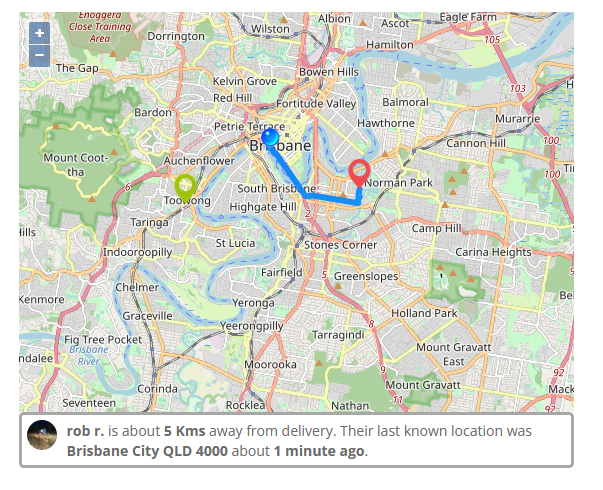
When you are Online, customers who have a job in progress will be able to see your current location on a map as well as an estimate of the distance to the collection or delivery (example below).
When you are Offline, nobody will be able to see your location, only your last known location from when you were last online.
Customers can view your location on a map when their job has been started and you are set to Online. If both of these conditions are met, then the customer will be able to see a map on their listing page that looks something like the below.
Good to know tip: To maintain a level of privacy, there is a zoom limitation on the customer map which means they can not zoom all the way in to see your exact position on the map.
We hope that this assists in your queries about our tracking options! As always, if you have any further questions or queries, please reach out to us on 1800 859 850 or support@truckit.net.

News · Managed Services Freight is the friction your business doesn’t need. Here’s how managed services remove it. Why more Australian businesses are handing their freight to a managed service, and what they get back. KD Kieran Dawkins Head of Managed Services · Truckit.net 18 July 2026 · 5 min read While most businesses can understand a freight rate card, a lot aren’t quite aware of the true freight costs to their business. Everything from the time it takes to procure and manage carriers, to increasing capacity at short notice, through to chasing ETAs, reconciling invoices, misaligned payment terms and […]

We’ve been busy building behind the scenes, and a wave of new features have just rolled out. Most of it points the same way: putting AI to work on the parts of freight that used to eat your time. Searching for jobs, writing your profile, matching the right provider to the right load. Here is what is live now, and what we are working on next. You can now find freight jobs just by asking Type "find container jobs within 100km of Maryborough" into the Search Jobs page, and Truckit knows exactly what you mean. No filters to set, no […]

Introducing Rates Manager: Stop Quoting Manually. Start Winning More Jobs. Product Update · For Providers Introducing Rates Manager: Stop Quoting Manually. Start Winning More Jobs. Truckit.net May 2026 5 min read Rates Manager is live in your provider portal. Upload your pricing once and Truckit quotes on your behalf, instantly, 24/7, without you lifting a finger. Every job you have missed because you were on the road, asleep, or too busy to respond is a job that went to someone else. Not because your price was wrong. Because your price was not there when the shipper needed it. Rates Manager […]